
Your Q4 2026 Shopify App Stack: 10 Apps Matched to the Store You Run
Most Q4 app lists tell you what each app does. They rarely tell you whether your store needs it. A store selling sweaters in eight colors loses sales in different places than a shop engraving…
Most Q4 app lists tell you what each app does. They rarely tell you whether your store needs it.
A store selling sweaters in eight colors loses sales in different places than a shop engraving necklaces. Both look nothing like a brand trying to stand out in a week when every competitor is running 30% off. So we sorted these 10 apps by the kind of store they help most. Find the stack that looks like yours, start there, and skip the rest.
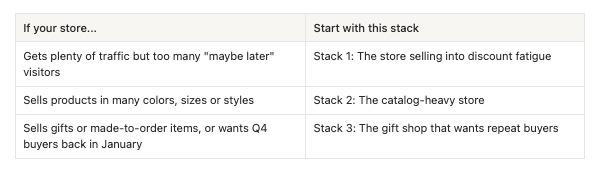
Stack 1: The store selling into discount fatigue
In Black Friday week, your 20% off sits next to everyone else's 20% off. The stores that protect margin aim discounts at the shoppers who need a nudge, show proof of what's selling, and give shoppers a reason to buy beyond the discount. These four apps cover those jobs, from personal offers to games and giveaways that make shoppers earn their reward.
Growth Suite
Growth Suite spots visitors who are interested but still deciding, then gives them a personal discount code with a countdown timer. The code works only for them and only for a short time, so "I'll buy it later" gets a real deadline. Bundles, volume discounts, free gifts, add-ons and post-purchase offers live in the same app.
Your Q4 move: Run it through the browsing weeks before Black Friday, when visitors add to cart and leave to wait for a deal. Before sale week, check in Shopify's discount settings how Growth Suite codes combine with your sitewide offer.
Built for Shopify and used by 300+ stores in 40+ countries. Install Growth Suite from the Shopify App Store.
SSM Sold Counter Social Proof
SSM Sold Counter shows sold counts like "23 sold today", best-seller badges ranked within each collection, and live activity like "8 carted in the last hour". Every number comes from your Shopify orders and live store traffic. Labels sit on product images, in collection grids or beside Add to cart, with shopper-facing text in 17 languages.
Your Q4 move: Turn on collection-ranked best-seller badges on your gift guide and holiday collections. First-time Q4 visitors don't know your catalog yet, and a ranked badge shows them where to start.
Free for up to 10,000 monthly visitors, with a 14-day trial on paid plans. Add SSM Sold Counter Social Proof from the Shopify App Store.
PieceUp
PieceUp turns a discount popup into a jigsaw puzzle. Shoppers drag a few pieces into place, pick a prize, and get a real, single-use Shopify discount code. You choose the image, the difficulty, the prizes and when it appears, and orders placed with a PieceUp code are matched back to the puzzle that issued it.
Your Q4 move: Show the puzzle on product pages only and limit it to once a day, so it reaches shoppers who are already looking at a product. On Premium, run free shipping against a percentage off as two puzzles and keep the one that brings in more revenue.
Try PieceUp on the Shopify App Store.
Giveaway Ninja
Giveaway Ninja turns giveaways into a sales and list-building engine for your store. Every order, referral and social action can earn entries, so the campaign drives revenue and doesn't only collect emails. Bonus rules reward launches, flash sales, bundles and spend thresholds, and the built-in live draw picks winners at random.
Your Q4 move: Run one sweepstakes across the season instead of a new giveaway for every sale. Give bonus entries on bundles and spend thresholds during Black Friday week, then add a final-hours boost before your last shipping date.
Install Giveaway Ninja from the Shopify App Store.
Stack 2: The catalog-heavy store
If you sell apparel, accessories or home goods in several options, Q4 is hard on a messy catalog. Seasonal photos need to go live fast, and shoppers need to see the exact option they came for without digging. These four apps cover the catalog from the back office to the collection page.
CS - Smart Image Upload
CS - Smart Image Upload by Craftshift brings thousands of product and variant images from Google Drive or Dropbox into your store in one run. It matches each image by SKU, barcode, title, metafield or variant ID, and shows a full preview before anything is uploaded.
Your Q4 move: Name your seasonal photo files by SKU before the shoot wraps, then rerun the matching preview until nothing is left unmatched. Unmatched images export as a CSV, so fixing file names is a quick pass instead of a product-by-product hunt.
Built for Shopify, free plan available, 5.0 rating from 110 reviews. Get CS - Smart Image Upload on the Shopify App Store.
CS - Export Product Images
CS - Export Product Images, also from Craftshift, downloads product and variant images, videos, 3D models and your Content > Files in one ZIP. Filter by status, vendor, collection or date, set your own folder structure, and get an email when the export is ready.
Your Q4 move: Run one full export before you touch your theme or bulk-edit anything for Black Friday. Then run filtered exports by collection for everyone who needs assets this season: your designer, your ad agency, a wholesale partner or a marketplace listing.
Built for Shopify, free plan available, 4.7 rating from 31 reviews. Get CS - Export Product Images on the Shopify App Store.
Stamp Show Variants on Collection
Shopify collection pages show one card per product, so a shirt in eight colors appears once. Stamp, built by Sezerium, splits products into variant cards on collection and search pages, each with its own image, title and price in your theme's card design. It also adds swatches and Smart sort, and works with any theme, including PageFly, GemPages, EComposer and Instant pages, without code.
Your Q4 move: Turn on the option to hide sold out variants and let Smart sort run during your sale. When a color sells out, it drops down the grid instead of holding a top spot your ads are paying to fill. Read more about Q4 moves here.
Built for Shopify, free plan to preview the features, 5.0 rating from 175 reviews. Install Stamp Show Variants on Collection from the Shopify App Store.
Rubik Variant Images
Shopify assigns one image directly to each variant, so a shopper who picks "Blue" can still scroll past every other color. Rubik Variant Images by Craftshift lets you assign multiple images per variant by hand, with AI or in bulk, and the gallery updates the moment a shopper picks an option. It also adds color and image swatches and works with 350+ themes without code.
Your Q4 move: Bulk assign images for your holiday collection first, since that's where most of your Q4 ad clicks will land. Paired with Stamp, the shopper sees the right color in the grid and keeps seeing it after clicking through. Read more about Black Friday moves here.
Built for Shopify, free plan available, 5.0 rating from 481 reviews. Install Rubik Variant Images from the Shopify App Store.
Stack 3: The gift shop that wants repeat buyers
If you sell engraved jewelry, printed shirts, gift boxes or anything made to order, your Q4 risk isn't traffic. It's the details. A wrong name or a missed delivery date in December costs you a refund and a customer.
The second risk comes after the holidays: a December gift buyer who never hears from you again. This stack gets the gift order right first, then gives you a channel to reach that buyer for the next birthday or anniversary.
Mini: Custom Fields Personalize
Mini: Custom Fields adds personalization inputs to the product page: text boxes, dropdowns, date pickers, file uploads, swatches, font selectors and more. Conditional logic shows a field only when it's needed, and paid options like gift wrap go into the cart as their own line item. Every answer is saved with the order, so your team knows exactly what to make.
Your Q4 move: Add a paid gift wrap checkbox, then use conditional logic so a gift message box appears only when it's ticked. Add a date picker for delivery so December buyers tell you their deadline up front, not in a support email. Read more about your Black Friday move.
Built for Shopify, free plan available, 5.0 rating from 142 reviews. Add Mini: Custom Fields Personalize from the Shopify App Store.
Shopney
Shopney turns your Shopify or Shopify Plus store into branded iOS and Android apps without code, and merchants can go live in as little as five days. Once shoppers install, you can reach them with unlimited free push notifications, abandoned cart recovery and app-exclusive offers. It connects with loyalty and subscription apps and takes zero commission on sales.
Your Q4 move: Plan the launch with enough room for the build and app store submission before Black Friday traffic arrives. Then give first-time Q4 buyers an app-exclusive offer, so they download while your brand is still fresh in their mind.
Trusted by 3,000+ Shopify brands. Build your mobile app with Shopney from the Shopify App Store.
Gift shops also lean on Stack 1: a December giveaway gives last-minute buyers one more reason to order before your shipping cutoff.
Where to start if you only add one app
Most stores fit more than one stack, but few have time to set up ten apps before Black Friday. Ask one question: where did last year's Q4 shoppers drop off? Then pick the app that fixes that step.
- They added to cart and left to wait for a better deal: start with Growth Suite or Giveaway Ninja from Stack 1.
- They didn't find the right option: start with Stamp or Rubik from Stack 2.
- They found it but couldn't customize it: start with Mini: Custom Fields from Stack 3.
- They bought once and never came back: start with Shopney from Stack 3.
Whatever you pick, install it in October. That leaves a few weeks to test it on real traffic before your busiest days.
Which Shopify apps help most with Black Friday sales?
It depends on where your store loses shoppers. Stores with many variants usually gain the most from Stamp and Rubik. Stores with high traffic and low conversion should look at Growth Suite, SSM Sold Counter and PieceUp first.
How can I run a holiday giveaway that drives sales, not only signups?
Use purchase-based entries. With Giveaway Ninja, every order can earn entries, and bonus rules can reward bundles, spend thresholds or a new product. Refer-a-friend and social actions keep a free way to enter open for shoppers who don't buy.
How do I keep Q4 customers after the holidays?
Move them to a channel you own. A giveaway grows your email list during the season, and a mobile app built with Shopney lets you reach repeat buyers with push notifications in January and beyond.