Giveaway Ninja API Documentation
Setup
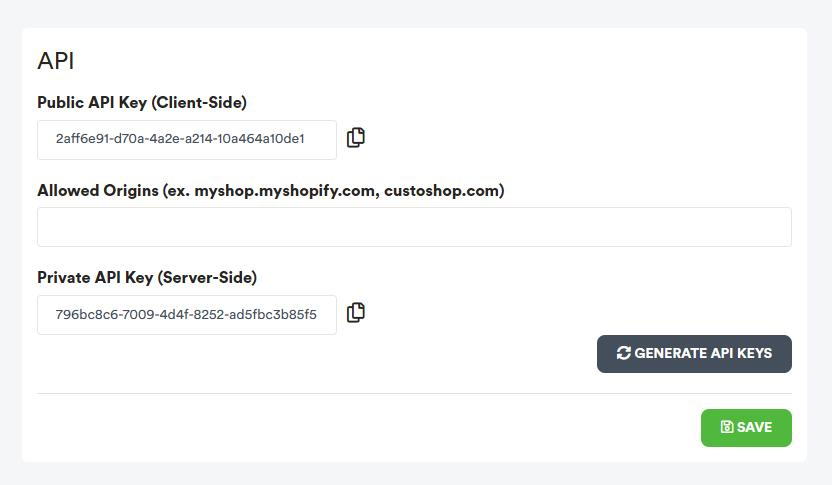
API Keys are available from the SETUP > API menu in your dashboard.
Public API Key — used in client-side (browser) requests. Safe to expose in JavaScript.
Private API Key — used for server-to-server integrations only. Keep this secret.
Allowed Origins must contain the domains you are using the Public API on (comma-separated). For example: myshop.myshopify.com, mycustomdomain.com.
extensions.shopifycdn.com to Allowed Origins to use the Client API inside Shopify Checkout and Thank-You page extensions.
Base URL
All API requests are made to:
https://api.giveaway.ninjaAuthentication
Client API endpoints authenticate via the apiKey field in the JSON request body (Public API Key). The server also verifies the Origin header against your Allowed Origins list.
REST API endpoints authenticate via the apiKey field in the JSON request body (Private API Key). No origin check is performed.
Rate Limiting
All Client API endpoints are rate-limited to 15 requests per minute per IP address. If you exceed this limit, the API will return TooManyRequests.
calculateOrderEntries endpoint skips rate limiting when the origin is extensions.shopifycdn.com, since Shopify checkout extensions may fire multiple requests during the checkout flow.
API Logs
All API requests are logged and can be reviewed from your dashboard under LOGS > API.
The logs show request details including the timestamp, IP address, origin, payload content, and response status. This is useful for debugging integration issues and monitoring API usage.
REST API
The Private API Key is used for server-to-server integrations. Keep it secure and never expose it in client-side code.
AddUserEntries
Overview
Add entries for a specific user in a giveaway. Use this endpoint to award entries from your own backend logic (e.g. custom purchase flows, CRM events, or third-party integrations).
Request
| Parameter | Type | Required | Description |
|---|---|---|---|
| apiKey | string | Required | Your Private API Key |
| giveawayId | string | Required | The giveaway ObjectId |
| string | Required | User's email address | |
| entries | integer | Required | Number of entries to add |
| description | string | Optional | Description of why entries were awarded |
Example Request (cURL)
curl -X POST "https://api.giveaway.ninja/api/server/addUserEntries" \
  -H "Content-Type: application/json" \
  -d '{
    "apiKey": "your_private_api_key",
    "giveawayId": "your_giveaway_id",
    "email": "user@example.com",
    "entries": 10,
    "description": "Bonus entries for VIP customer"
  }'
Response
Returns the same response structure as the getUserInfo endpoint, including the user's updated total entries.
Tip: Use https://reqbin.com/curl to run quick tests.
getUserInfo
Overview
Retrieve a user's giveaway data including total entries, referral information, sale value, and a breakdown of all purchase orders with their entry calculations. Use this when you want to display a user's giveaway status on your storefront.
Request
| Parameter | Type | Required | Description |
|---|---|---|---|
| giveawayId | string | Required | The giveaway ObjectId |
| apiKey | string | Required | Your Public API Key |
| string | Required | User's email address (also accepts phone number) |
Success Response
{
  "status": "Success",
  "data": {
    "totalEntries": 125,
    "saleValue": 487.50,
    "emailConfirmed": "true",
    "referralId": "XYZ1234",
    "referralCount": 8,
    "orders": [
      {
        "orderId": "5001",
        "orderPoints": "50",
        "validation": "{\"OrderId\":\"5001\",\"OrderSource\":\"shopify\",\"OrderSourceResult\":{\"Description\":\"Valid order\",\"IsValid\":true},\"OrderPoints\":50,\"OrderPointsDescription\":\"Entries per currency spent: 1 points per 3 USD (subtotal)\",\"BundleRulePoints\":0,\"BundleRuleResults\":[],\"PurchaseRulePoints\":10,\"TotalPoints\":60,\"PurchasePeriodResult\":null,\"AovBoosterResult\":null,\"OrderDateRangeResult\":{\"Description\":\"Order within valid date range\",\"IsValid\":true},\"MinimumOrderValueResult\":{\"Description\":\"Minimum order value reached\",\"IsValid\":true},\"AttributionMethod\":\"subtotal\",\"PurchaseRuleResults\":[\"Product X matched: +10 points\"],\"GiftCardAmount\":null,\"GiftCardInfo\":null}"
      }
    ]
  }
}| Field | Type | Description |
|---|---|---|
| totalEntries | integer | Total entries earned by the user |
| saleValue | decimal | Total sale value attributed to the user |
| emailConfirmed | string | "true" if the user clicked the confirmation email |
| referralId | string | Referral code assigned to the user (use with ?njref= querystring) |
| referralCount | integer | Number of users referred |
| orders | array | List of purchase orders with entry details |
| orders[].orderId | string | The Shopify order ID |
| orders[].orderPoints | string | Points earned from this order |
| orders[].validation | string (JSON) | Detailed entry calculation breakdown (TotalPoints, PurchaseRuleResults, BundleRuleResults, etc.) |
Error Responses
| Status | Description |
|---|---|
| PayloadMissing | Request body is empty or malformed |
| TooManyRequests | Rate limit exceeded (15 requests/min per IP) |
| MissingApiKey | The apiKey field is missing |
| InvalidApiKey | The API key does not match any subscription |
| OriginNotAllowed | The request origin is not in your Allowed Origins list |
| MissingGivewayId | The giveawayId field is missing |
| EmailMissing | The email field is missing |
| GiveawayOrUserNotFound | No user found with this email in the specified giveaway |
JavaScript Demo
fetch('https://api.giveaway.ninja/api/client/getUserInfo', {
  method: 'POST',
  headers: { 'Content-Type': 'application/json' },
  body: JSON.stringify({
    giveawayId: 'YOUR_GIVEAWAY_ID',
    apiKey: 'YOUR_PUBLIC_API_KEY',
    email: 'customer@example.com'
  })
})
.then(response => response.json())
.then(data => {
  if (data.status === 'Success') {
    console.log('Total entries:', data.data.totalEntries);
    console.log('Referral code:', data.data.referralId);
    console.log('Orders:', data.data.orders);
  } else {
    console.error('API error:', data.status);
  }
})
.catch(error => console.error('Request failed:', error));
HTML Demo
<div id="giveaway-info">
  <p>Loading...</p>
</div>

<script>
(function() {
  var container = document.getElementById('giveaway-info');

  fetch('https://api.giveaway.ninja/api/client/getUserInfo', {
    method: 'POST',
    headers: { 'Content-Type': 'application/json' },
    body: JSON.stringify({
      giveawayId: 'YOUR_GIVEAWAY_ID',
      apiKey: 'YOUR_PUBLIC_API_KEY',
      email: '{{ customer.email }}'  // Shopify Liquid variable
    })
  })
  .then(function(r) { return r.json(); })
  .then(function(data) {
    if (data.status === 'Success') {
      var d = data.data;
      container.innerHTML =
        '<p><strong>Total Entries:</strong> ' + d.totalEntries + '</p>' +
        '<p><strong>Sale Value:</strong> $' + d.saleValue.toFixed(2) + '</p>' +
        '<p><strong>Referral Code:</strong> ' + d.referralId + '</p>' +
        '<p><strong>Referrals:</strong> ' + d.referralCount + '</p>';
    } else if (data.status === 'GiveawayOrUserNotFound') {
      container.innerHTML = '<p>No giveaway data found for this user.</p>';
    } else {
      container.innerHTML = '<p>Error: ' + data.status + '</p>';
    }
  })
  .catch(function(err) {
    container.innerHTML = '<p>Could not load giveaway data.</p>';
  });
})();
</script>
calculateEntries
Overview
Calculate the number of entries a single product would earn based on the giveaway's purchase rules, bundle rules, time multipliers, and AOV boosters. Use this on product pages to show customers how many entries they'll earn before purchasing.
Request
| Parameter | Type | Required | Description |
|---|---|---|---|
| giveawayId | string | Required | The giveaway ObjectId |
| apiKey | string | Required | Your Public API Key |
| productId | string | Required | Shopify product ID |
| variantId | string | Required | Shopify variant ID |
| quantity | integer | Required | Quantity (must be > 0) |
| price | integer | Required | Unit price in cents (e.g. $50.00 = 5000) |
Success Response
{
  "status": "Success",
  "data": {
    "totalEntries": 15,
    "ruleType": "quantity",
    "ruleEntries": 5,
    "ruleQuantity": 1,
    "ruleAmount": 0,
    "multiplier": 2,
    "orderRuleEntries": 10,
    "orderRuleAmount": 1,
    "hasOrderRule": true,
    "rewardAmountSpent": 1,
    "isExpired": false,
    "bonusOrderEntries": 50,
    "bonusOrderEntriesOver": 100.00,
    "aovMultiplier": 1,
    "isAovBooster": false,
    "aovExcludeFromOrderTotal": false
  }
}| Field | Type | Description |
|---|---|---|
| totalEntries | integer | Total product entries calculated |
| ruleType | string|null | Product rule type: "quantity" or "amount", or null if no product rule |
| ruleEntries | integer | Entries awarded per rule threshold |
| ruleQuantity | integer | Quantity threshold (for quantity-based rules) |
| ruleAmount | decimal | Amount threshold (for amount-based rules) |
| multiplier | integer | Active time booster multiplier (1 = no boost) |
| orderRuleEntries | integer | Base entries from order-level rule |
| orderRuleAmount | decimal | Order rule amount threshold (0 = fixed mode) |
| hasOrderRule | boolean | Whether order-level rules apply |
| rewardAmountSpent | integer | Reward mode: 0 = fixed per order, 1 = per amount spent, 2 = product rules only |
| isExpired | boolean | true if the giveaway is not active |
| bonusOrderEntries | integer | Bonus entries for orders over a threshold |
| bonusOrderEntriesOver | decimal | Order value threshold for bonus entries |
| aovMultiplier | integer | AOV booster multiplier (if product is a booster) |
| isAovBooster | boolean | true if this product is an AOV booster |
| aovExcludeFromOrderTotal | boolean | true if this booster's value is excluded from order total calculations |
Error Responses
| Status | Description |
|---|---|
| PayloadMissing | Request body is empty or malformed |
| TooManyRequests | Rate limit exceeded |
| MissingApiKey | The apiKey field is missing |
| InvalidApiKey | The API key does not match any subscription |
| OriginNotAllowed | The request origin is not in your Allowed Origins list |
| MissingGiveawayId | The giveawayId field is missing |
| MissingProductId | The productId field is missing |
| MissingVariantId | The variantId field is missing |
| InvalidQuantity | Quantity must be greater than 0 |
| InvalidPrice | Price cannot be negative |
| GiveawayNotFound | No giveaway found with the given ID |
| NoBoostSalesAction | The giveaway does not have purchase entries enabled |
| InvalidProductId | The product ID is not a valid number |
| InvalidVariantId | The variant ID is not a valid number |
| ValidationFailed | Product did not match any entry rule (response includes data with zero entries) |
JavaScript Demo
// Calculate entries for a single product
// price = unit price in cents (Shopify format: $50.00 = 5000)
fetch('https://api.giveaway.ninja/api/client/calculateEntries', {
  method: 'POST',
  headers: { 'Content-Type': 'application/json' },
  body: JSON.stringify({
    giveawayId: 'YOUR_GIVEAWAY_ID',
    apiKey: 'YOUR_PUBLIC_API_KEY',
    productId: '7654321',
    variantId: '43210987',
    quantity: 1,
    price: 5000  // $50.00 in cents
  })
})
.then(response => response.json())
.then(data => {
  if (data.status === 'Success') {
    console.log('Entries for this product:', data.data.totalEntries);
    console.log('Rule type:', data.data.ruleType);
    console.log('Time multiplier:', data.data.multiplier + 'x');

    if (data.data.isExpired) {
      console.log('Giveaway has ended');
    }
  } else {
    console.error('API error:', data.status);
  }
})
.catch(error => console.error('Request failed:', error));
HTML Demo
<div id="entries-badge" style="display:none; padding:10px; background:#f0fff0; border:1px solid #ccc; border-radius:6px;">
  <span id="entries-count"></span> entries with this product
</div>

<script>
(function() {
  // Replace with your actual values or use Shopify Liquid variables
  var productId = '{{ product.id }}';
  var variantId = '{{ product.selected_or_first_available_variant.id }}';
  var price = {{ product.selected_or_first_available_variant.price }};  // Already in cents in Liquid

  fetch('https://api.giveaway.ninja/api/client/calculateEntries', {
    method: 'POST',
    headers: { 'Content-Type': 'application/json' },
    body: JSON.stringify({
      giveawayId: 'YOUR_GIVEAWAY_ID',
      apiKey: 'YOUR_PUBLIC_API_KEY',
      productId: productId,
      variantId: variantId,
      quantity: 1,
      price: price
    })
  })
  .then(function(r) { return r.json(); })
  .then(function(data) {
    if (data.status === 'Success' && data.data.totalEntries > 0) {
      document.getElementById('entries-count').textContent = data.data.totalEntries;
      document.getElementById('entries-badge').style.display = 'block';
    }
  })
  .catch(function(err) {
    console.error('Failed to load entries:', err);
  });
})();
</script>
calculateEntriesBatch
Overview
Calculate entries for multiple products in a single request. Use this on collection pages or grids to efficiently fetch entry data for all visible products at once, instead of making individual API calls per product.
Request
| Parameter | Type | Required | Description |
|---|---|---|---|
| giveawayId | string | Required | The giveaway ObjectId |
| apiKey | string | Required | Your Public API Key |
| products | array | Required | Array of product objects (see below) |
| Parameter | Type | Required | Description |
|---|---|---|---|
| productId | string | Required | Shopify product ID |
| variantId | string | Required | Shopify variant ID |
| quantity | integer | Required | Quantity (must be > 0) |
| price | integer | Required | Unit price in cents (e.g. $50.00 = 5000) |
Success Response
{
  "status": "Success",
  "data": [
    {
      "productId": "7654321",
      "variantId": "43210987",
      "status": "Success",
      "totalEntries": 15,
      "ruleType": "quantity",
      "ruleEntries": 5,
      "ruleQuantity": 1,
      "ruleAmount": 0,
      "multiplier": 2,
      "orderRuleEntries": 10,
      "orderRuleAmount": 1,
      "hasOrderRule": true,
      "rewardAmountSpent": 1,
      "isExpired": false,
      "bonusOrderEntries": 50,
      "bonusOrderEntriesOver": 100.00,
      "aovMultiplier": 1,
      "isAovBooster": false,
      "aovExcludeFromOrderTotal": false
    }
  ]
}
The data array contains one result per product, in the same order as the request. Each result includes all fields from calculateEntries plus productId, variantId, and an individual status per product.
Success, Giveaway-Expired, ValidationFailed, InvalidProductId, or InvalidVariantId.
The top-level status is Success as long as the batch request itself is valid.
Error Responses
| Status | Description |
|---|---|
| PayloadMissing | Request body is empty or malformed |
| TooManyRequests | Rate limit exceeded |
| MissingApiKey | The apiKey field is missing |
| InvalidApiKey | The API key does not match any subscription |
| OriginNotAllowed | The request origin is not in your Allowed Origins list |
| MissingGiveawayId | The giveawayId field is missing |
| MissingProducts | The products array is missing or empty |
| MissingProductId | A product in the array is missing productId |
| MissingVariantId | A product in the array is missing variantId |
| InvalidQuantity | A product has quantity <= 0 |
| InvalidPrice | A product has negative price |
| GiveawayNotFound | No giveaway found with the given ID |
| NoBoostSalesAction | The giveaway does not have purchase entries enabled |
JavaScript Demo
// Calculate entries for multiple products in one request
// Ideal for collection pages to avoid multiple API calls
fetch('https://api.giveaway.ninja/api/client/calculateEntriesBatch', {
  method: 'POST',
  headers: { 'Content-Type': 'application/json' },
  body: JSON.stringify({
    giveawayId: 'YOUR_GIVEAWAY_ID',
    apiKey: 'YOUR_PUBLIC_API_KEY',
    products: [
      { productId: '111', variantId: '222', quantity: 1, price: 2500 },
      { productId: '333', variantId: '444', quantity: 1, price: 4900 },
      { productId: '555', variantId: '666', quantity: 1, price: 7500 }
    ]
  })
})
.then(response => response.json())
.then(data => {
  if (data.status === 'Success') {
    data.data.forEach(function(product) {
      console.log('Product ' + product.productId + ': ' +
        product.totalEntries + ' entries (' + product.status + ')');
    });
  }
})
.catch(error => console.error('Request failed:', error));
HTML Demo
<!-- Place badges inside your product grid items -->
<div class="product-grid">
  <div class="product-card" data-product-id="111" data-variant-id="222" data-price="2500">
    <p>Product A - $25.00</p>
    <span class="entry-badge" style="display:none;"></span>
  </div>
  <div class="product-card" data-product-id="333" data-variant-id="444" data-price="4900">
    <p>Product B - $49.00</p>
    <span class="entry-badge" style="display:none;"></span>
  </div>
</div>

<script>
(function() {
  var cards = document.querySelectorAll('.product-card');
  var products = [];

  cards.forEach(function(card) {
    products.push({
      productId: card.dataset.productId,
      variantId: card.dataset.variantId,
      quantity: 1,
      price: parseInt(card.dataset.price)
    });
  });

  fetch('https://api.giveaway.ninja/api/client/calculateEntriesBatch', {
    method: 'POST',
    headers: { 'Content-Type': 'application/json' },
    body: JSON.stringify({
      giveawayId: 'YOUR_GIVEAWAY_ID',
      apiKey: 'YOUR_PUBLIC_API_KEY',
      products: products
    })
  })
  .then(function(r) { return r.json(); })
  .then(function(data) {
    if (data.status === 'Success') {
      data.data.forEach(function(result, i) {
        if (result.status === 'Success' && result.totalEntries > 0) {
          var badge = cards[i].querySelector('.entry-badge');
          badge.textContent = result.totalEntries + ' entries';
          badge.style.display = 'inline-block';
        }
      });
    }
  })
  .catch(function(err) { console.error('Batch request failed:', err); });
})();
</script>
calculateOrderEntries
Overview
Calculate the total entries an entire cart/order would earn, including order-level points, product-specific purchase rules, bundle rules, time multipliers, AOV boosters, and minimum order requirements. Designed for checkout and cart pages to show customers the total entries they'll earn for the entire order.
Request
| Parameter | Type | Required | Description |
|---|---|---|---|
| giveawayId | string | Required | The giveaway ObjectId |
| apiKey | string | Required | Your Public API Key |
| cartData | object | Required | Cart data object (see below) |
| Parameter | Type | Required | Description |
|---|---|---|---|
| items | array | Required | Array of cart items |
| subtotal | integer | Required | Cart subtotal in cents (before discounts, shipping, taxes) |
| total | integer | Required | Cart total in cents (after discounts, before shipping/taxes) |
| currency | string | Optional | Currency code (e.g. "USD") |
| Parameter | Type | Required | Description |
|---|---|---|---|
| productId | string | Required | Shopify product ID |
| variantId | string | Required | Shopify variant ID |
| quantity | integer | Required | Quantity of this item in the cart |
| price | integer | Required | Line total in cents (unit price × quantity, e.g. 2 items at $25 = 5000) |
price field in cartData.items is the line total (unit price × quantity) in cents, not the unit price. This differs from calculateEntries where price is the unit price.
Success Response
{
  "status": "Success",
  "data": {
    "totalEntries": 45,
    "orderPoints": 20,
    "bundleRulePoints": 10,
    "purchaseRulePoints": 15,
    "multiplier": 1,
    "aovMultiplier": 1,
    "calculationBase": 120.00,
    "attributionMode": "subtotal",
    "isExpired": false,
    "hasMinimumOrder": true,
    "minimumOrderValue": 50.00,
    "minimumOrderReached": true
  }
}| Field | Type | Description |
|---|---|---|
| totalEntries | integer | Total entries for the entire order (0 if minimum order not reached) |
| orderPoints | integer | Points from the order-level rule (based on order value or fixed) |
| bundleRulePoints | integer | Points from matched bundle rules |
| purchaseRulePoints | integer | Points from product-specific purchase rules |
| multiplier | integer | Active time booster multiplier (1 = no boost) |
| aovMultiplier | integer | AOV booster multiplier (stackable across matching products) |
| calculationBase | decimal | Order value used for calculation (after deducting excluded products) |
| attributionMode | string | "subtotal" or "total" — which order value is used |
| isExpired | boolean | true if the giveaway is not active |
| hasMinimumOrder | boolean | true if a minimum order value is configured |
| minimumOrderValue | decimal | Minimum order value required to earn entries |
| minimumOrderReached | boolean | true if the current order meets the minimum |
Error Responses
| Status | Description |
|---|---|
| PayloadMissing | Request body is empty or malformed |
| TooManyRequests | Rate limit exceeded |
| MissingApiKey | The apiKey field is missing |
| InvalidApiKey | The API key does not match any subscription |
| OriginNotAllowed | The request origin is not in your Allowed Origins list |
| MissingGiveawayId | The giveawayId field is missing |
| GiveawayNotFound | No giveaway found with the given ID |
| NoBoostSalesAction | The giveaway does not have purchase entries enabled |
cartData is null or has no items, the API returns a Success response with totalEntries: 0 rather than an error. This lets you safely call the API even before the customer has added items.
JavaScript Demo
// Calculate total order entries from Shopify cart data
// Fetch the current cart, then call the API
fetch('/cart.js')
  .then(response => response.json())
  .then(cart => {
    var cartData = {
      items: cart.items.map(item => ({
        productId: String(item.product_id),
        variantId: String(item.variant_id),
        quantity: item.quantity,
        price: item.final_line_price  // Line total in cents
      })),
      subtotal: cart.items_subtotal_price,
      total: cart.total_price,
      currency: cart.currency
    };

    return fetch('https://api.giveaway.ninja/api/client/calculateOrderEntries', {
      method: 'POST',
      headers: { 'Content-Type': 'application/json' },
      body: JSON.stringify({
        giveawayId: 'YOUR_GIVEAWAY_ID',
        apiKey: 'YOUR_PUBLIC_API_KEY',
        cartData: cartData
      })
    });
  })
  .then(response => response.json())
  .then(data => {
    if (data.status === 'Success') {
      console.log('Total entries for this order:', data.data.totalEntries);
      console.log('Order points:', data.data.orderPoints);
      console.log('Bundle points:', data.data.bundleRulePoints);
      console.log('Purchase rule points:', data.data.purchaseRulePoints);

      if (data.data.hasMinimumOrder && !data.data.minimumOrderReached) {
        console.log('Minimum order of $' +
          data.data.minimumOrderValue.toFixed(2) + ' not reached');
      }
    }
  })
  .catch(error => console.error('Request failed:', error));
HTML Demo
<div id="order-entries-banner" style="display:none; padding:12px; background:#e8f5e8; border:1px solid #c3e6c3; border-radius:6px; margin:10px 0;">
  <span id="order-entries-text"></span>
</div>

<script>
(function() {
  var banner = document.getElementById('order-entries-banner');
  var text = document.getElementById('order-entries-text');

  // Fetch the Shopify cart
  fetch('/cart.js')
    .then(function(r) { return r.json(); })
    .then(function(cart) {
      if (!cart.items || cart.items.length === 0) return;

      var cartData = {
        items: cart.items.map(function(item) {
          return {
            productId: String(item.product_id),
            variantId: String(item.variant_id),
            quantity: item.quantity,
            price: item.final_line_price
          };
        }),
        subtotal: cart.items_subtotal_price,
        total: cart.total_price,
        currency: cart.currency
      };

      return fetch('https://api.giveaway.ninja/api/client/calculateOrderEntries', {
        method: 'POST',
        headers: { 'Content-Type': 'application/json' },
        body: JSON.stringify({
          giveawayId: 'YOUR_GIVEAWAY_ID',
          apiKey: 'YOUR_PUBLIC_API_KEY',
          cartData: cartData
        })
      });
    })
    .then(function(r) { return r ? r.json() : null; })
    .then(function(data) {
      if (!data || data.status !== 'Success') return;
      var d = data.data;

      if (d.hasMinimumOrder && !d.minimumOrderReached) {
        text.textContent = 'Add $' +
          (d.minimumOrderValue - d.calculationBase).toFixed(2) +
          ' more to earn giveaway entries!';
        banner.style.background = '#fff8e1';
        banner.style.borderColor = '#ffe082';
        banner.style.display = 'block';
      } else if (d.totalEntries > 0) {
        var label = d.totalEntries === 1 ? ' entry' : ' entries';
        text.textContent = d.totalEntries + label + ' with this order!';
        banner.style.display = 'block';
      }
    })
    .catch(function(err) {
      console.error('Order entries error:', err);
    });
})();
</script>
AI Integration
Use AI coding assistants like Claude, ChatGPT, or GitHub Copilot to help you build your GiveawayNinja API integration faster.
Download the API reference file below and pass it to your AI assistant so it has full context about all endpoints, request/response formats, and error codes.
Download API ReferenceHow to use
- Download the
.mdfile above - Open your AI assistant (Claude, ChatGPT, Copilot, etc.)
- Upload or paste the file into the conversation
- Ask it to help you build your integration — for example: "Build me a Shopify section that shows how many giveaway entries the customer has earned"
Need API Help?