Entries Badge on Collections Grid
This guide will help you add the Giveaway Entries Badge to your Shopify theme's collection grid to display entry counts on product cards.
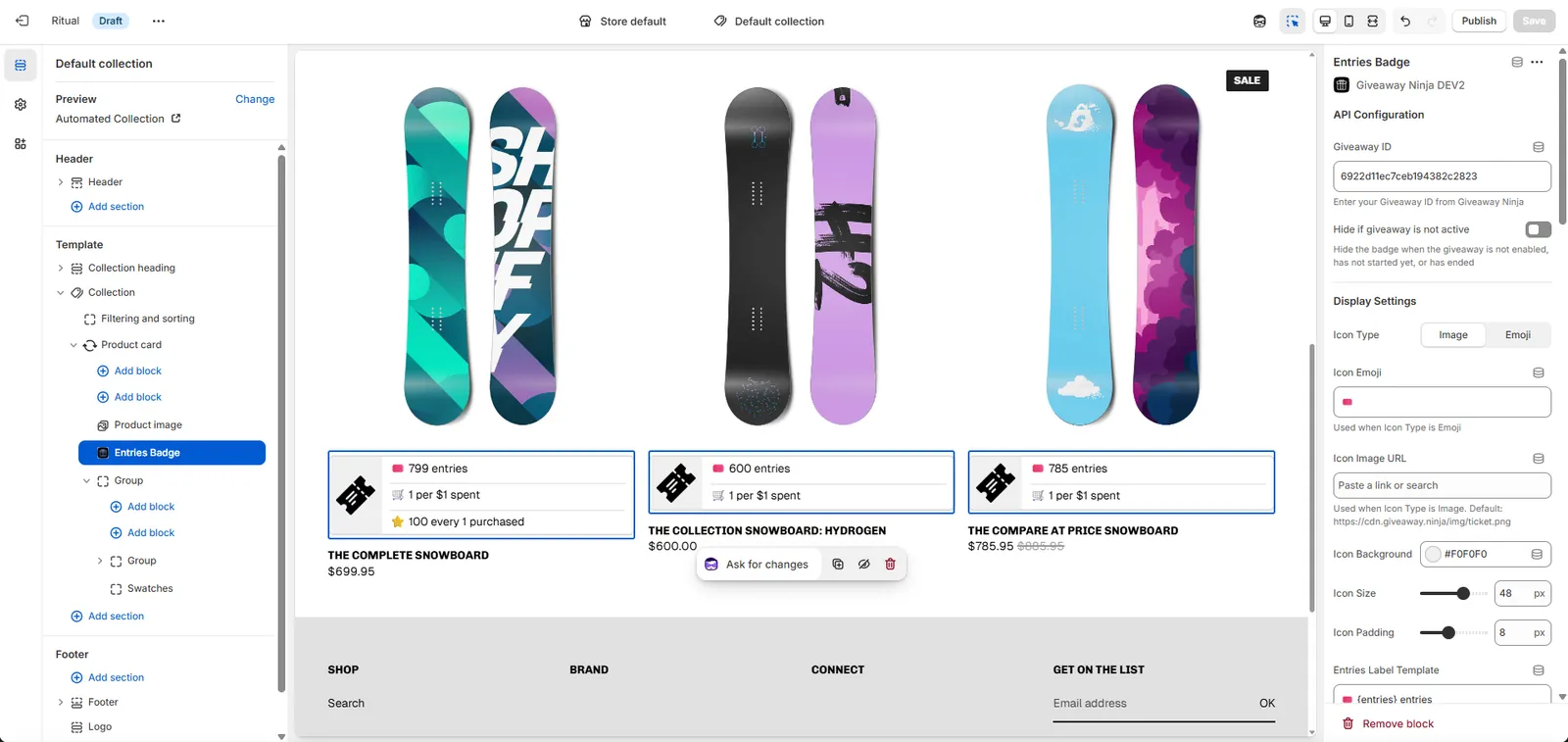
There are two ways to add the badge to your product cards, depending on your theme's capabilities:
Method A: App Blocks (Recommended for Modern Themes)
Use this if your theme supports App Blocks in Product Cards (e.g., Dawn, Refresh, Sense, Craft, Studio, Horizon, and most themes released after 2022).
App Blocks allow you to add the badge through the theme editor without editing code:
- Go to Shopify Admin → Online Store → Themes
- Click Customize on your theme
-
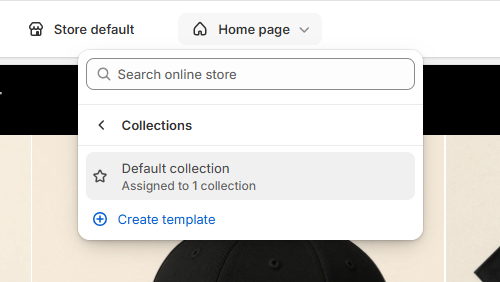
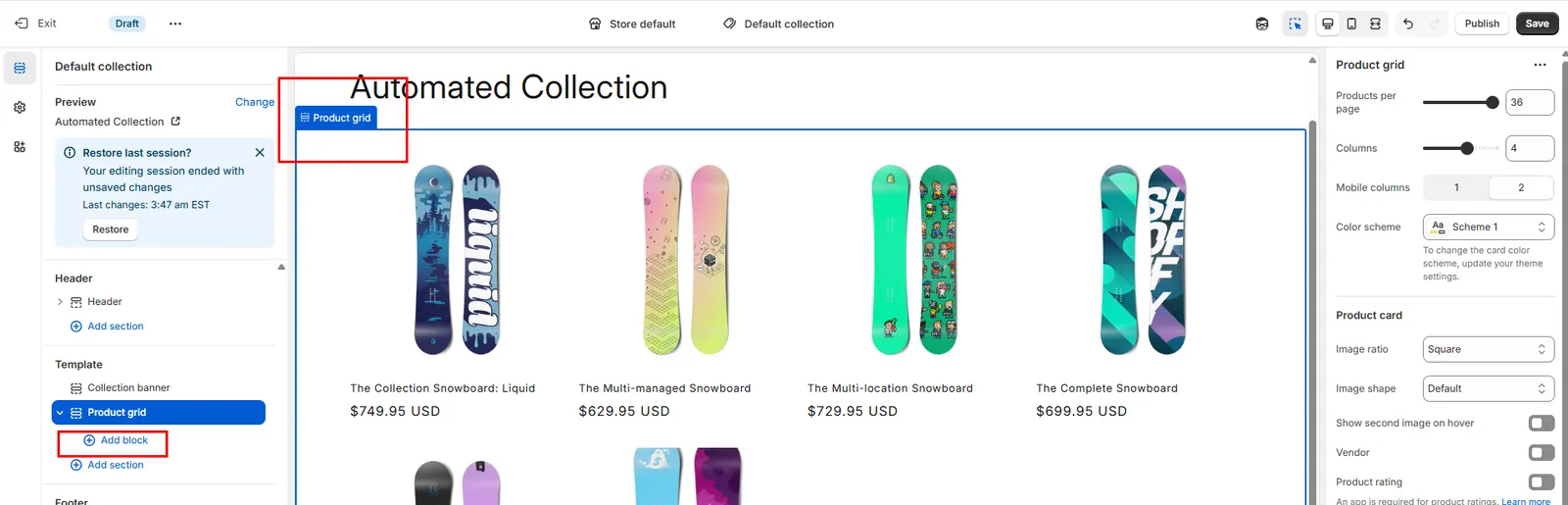
In the theme editor, navigate to a Collection page
- Click on a Product Card in the collection grid
-
Click Add block
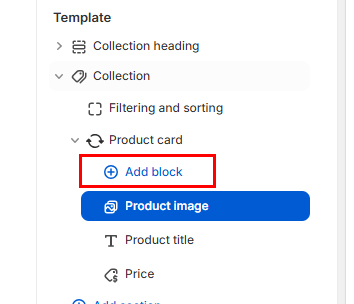
- Under Apps section, select Entries Badge
- Configure your giveaway settings and styling
- Click Save
Note: If you don't see the option to add blocks to Product Cards, your theme doesn't support App Blocks on product cards. Use Method B below instead.
Method B: Manual Integration (For Themes Without App Block Support)
Use this if your theme doesn't support App Blocks in Product Cards (e.g., Spotlight, Debut, Brooklyn, and most themes released before 2022).
To make your theme support App Blocks on product cards:
- Go to Shopify Admin → Online Store → Themes
- Click Actions → Edit code
- Find your collection product grid file (common names below)
- Edit the file to allow App Blocks
Common product grid files to look for:
sections/main-collection-product-grid.liquidsections/collection-template.liquidsections/featured-collection.liquidsnippets/product-card.liquidsnippets/card-product.liquid
Step 1: Add App Blocks to Schema
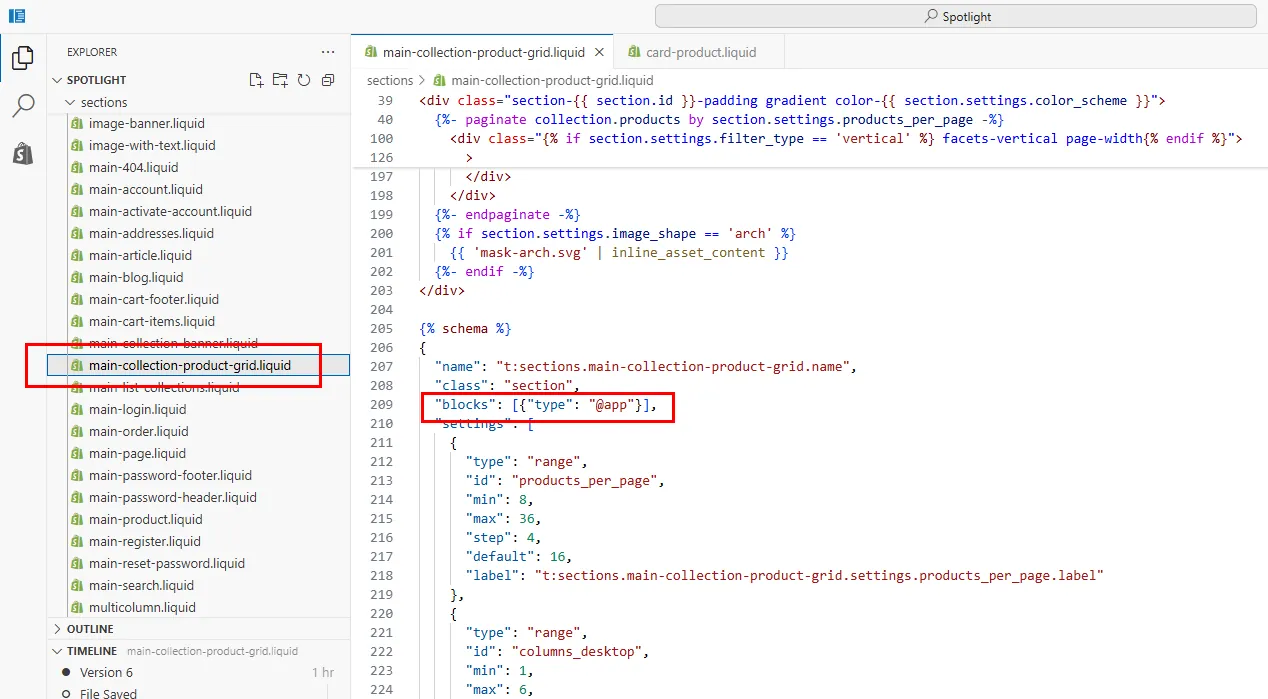
Scroll to the bottom of your file to find the {% schema %} section. Add this inside the schema JSON:
"blocks": [
  {
    "type": "@app"
  }
]
Important: Make sure to add commas where needed. The Shopify editor will highlight errors if the JSON is invalid.
Example schema structure:
{% schema %}
{
  "name": "Product Grid",
  "settings": [...],
  "blocks": [
    {
      "type": "@app"
    }
  ]
}
{% endschema %}
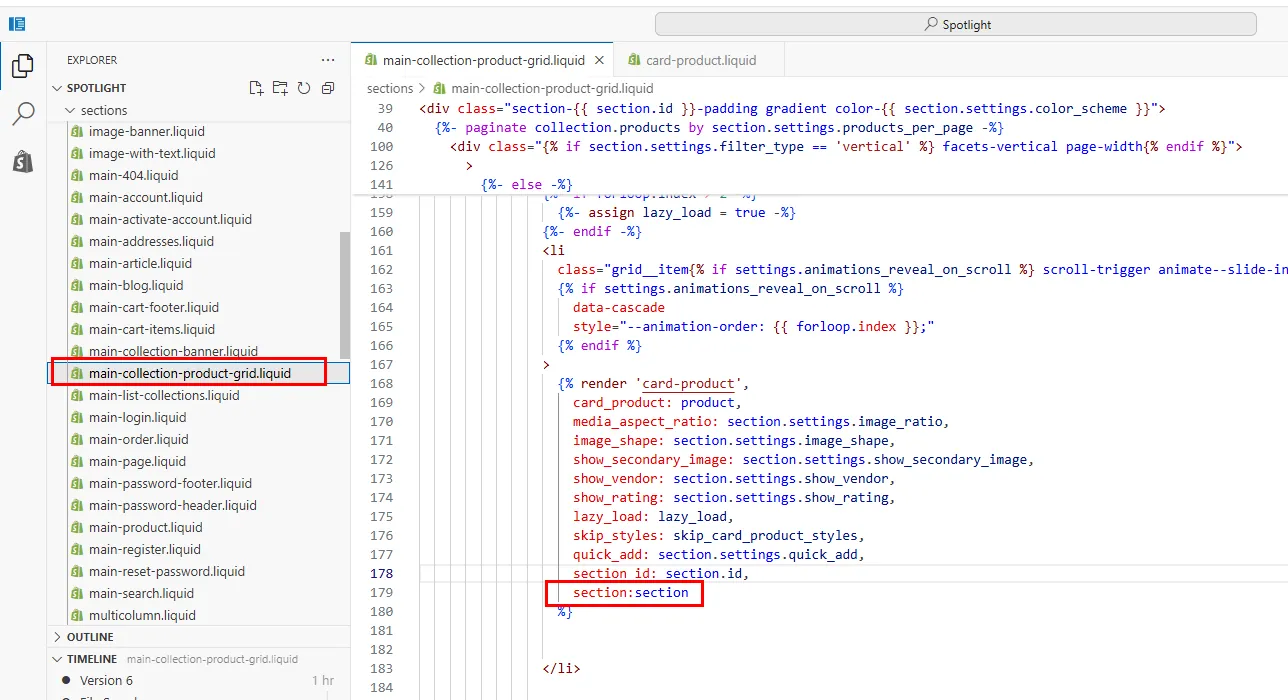
Step 2: Pass the section variable to the Product Card snippet
In your product grid section file, find where the product card snippet is rendered.
You need to add section: section to the render statement so the snippet can access app blocks.
Example: If your code looks like this:
{% render 'card-product', card_product: product %}
Update it to:
{% render 'card-product', card_product: product, section: section %}
Note: The snippet name may vary by theme (e.g., product-card, card-product, product-grid-item).
Step 3: Add Rendering Code
Open the Product Card snippet, find where you want the badge to appear (usually near the product price or title), and add this code:
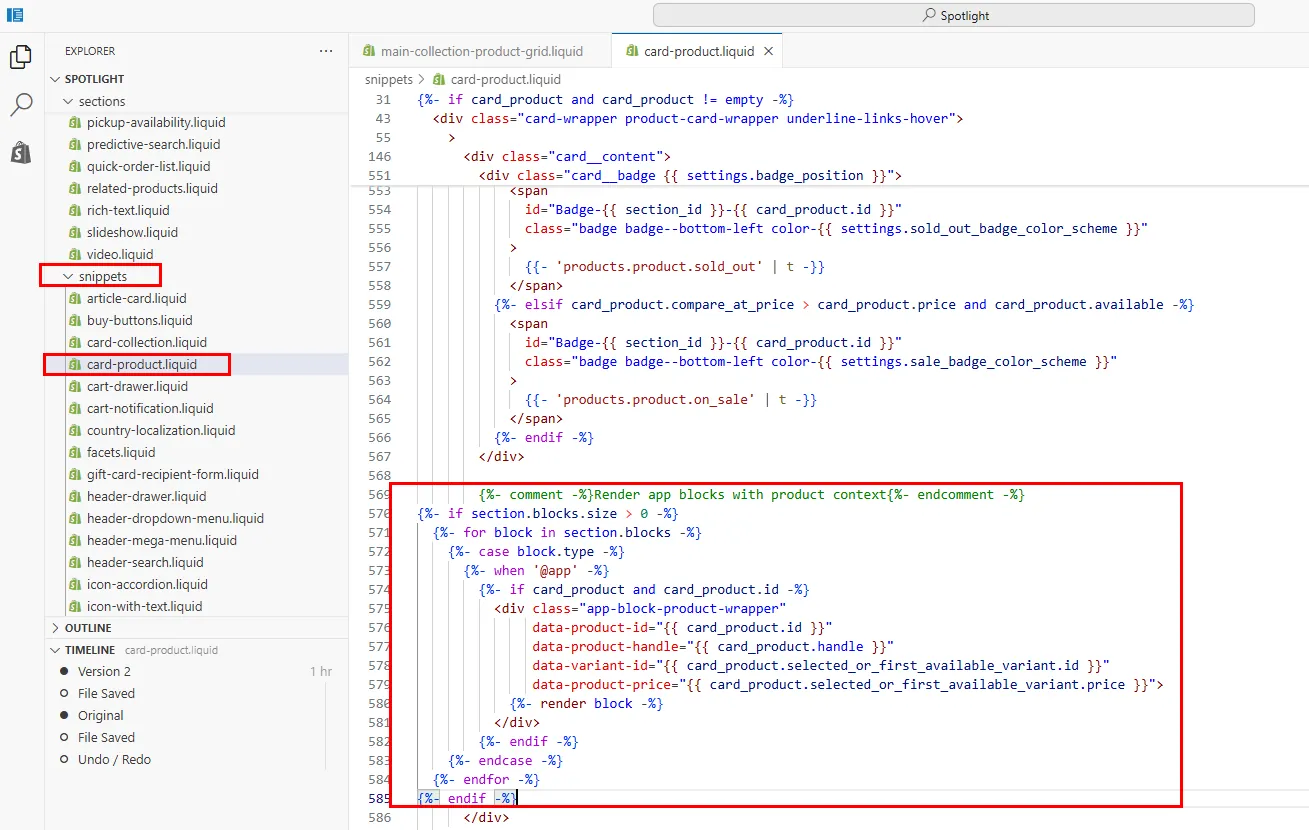
{%- comment -%}Render app blocks with product context{%- endcomment -%}
{%- if section.blocks.size > 0 -%}
  {%- for block in section.blocks -%}
    {%- case block.type -%}
      {%- when '@app' -%}
        {%- if card_product and card_product.id -%}
          <div class="app-block-product-wrapper"
               data-product-id="{{ card_product.id }}"
               data-product-handle="{{ card_product.handle }}"
               data-variant-id="{{ card_product.selected_or_first_available_variant.id }}"
               data-product-price="{{ card_product.selected_or_first_available_variant.price }}">
            {%- render block -%}
          </div>
        {%- endif -%}
    {%- endcase -%}
  {%- endfor -%}
{%- endif -%}
Note: The product variable might be named differently in your theme (e.g., card_product, product_item). Check your theme file and adjust accordingly.
After saving, you'll be able to add the Entries Badge app block through the theme editor!
Step 2: Test Your Integration
- Go to your Shopify storefront
- Navigate to a Collection page
- You should see the badge appear on each product card in the grid
- The badge will display entry counts based on your giveaway rules
Troubleshooting
Badge not showing?
- Make sure you added the app block through the theme editor
- Check that your giveaway is active and not expired
- Verify the app block is enabled on the Collection page template
- For Manual Integration (Method B): Ensure the wrapper code and schema were added correctly
Summary
- Method A (Modern Themes): Add the app block directly through the theme editor
- Method B (Legacy Themes): Edit your theme code to enable app blocks in product cards
- Configure your badge settings through the theme editor
- Test on a collection page to verify the badge appears correctly
- Deploy to your live theme when ready
That's it! Your collection grid will now display giveaway entry counts on product cards.
NEED HELP? Contact Us