Import Users and Purchase Entries
The Import Tool can be used to manually import orders/users from a CSV file and (optionally) award purchase entries.
This is useful if you are collecting entries from other sources, on-site events, etc.
For regular sales tracking, ensure to use the Make a Purchase entry action.
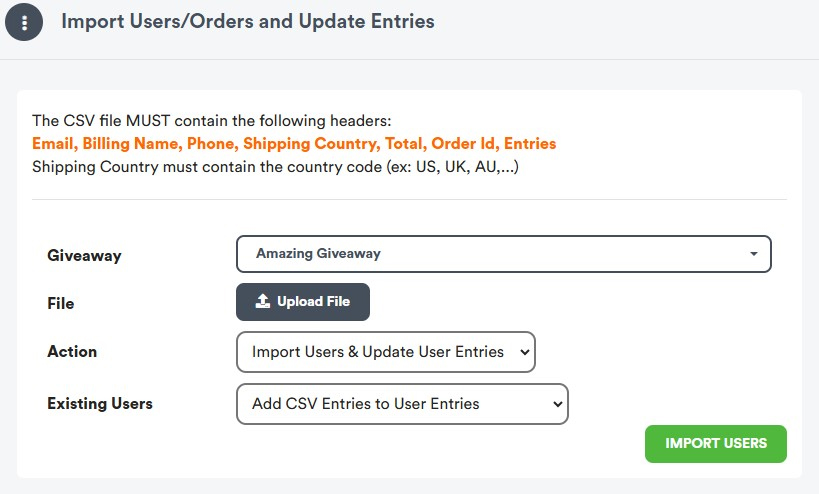
CSV File Requirements
The CSV file must contain all the headers described above, some fileds in the records might be optional.
- Email (required)
- Billing Name (the user name)
- Phone (optional)
- Shipping Country (iso country code ex. UK, US, CA, AU, ....)
- Total (required if the action is Import Orders & Reward Purchases)
- Order Id (required if the action is Import Orders & Reward Purchases)
- Entries (optional) - number of entries (points) you want to add or update on the user total entries
Import Process
- Open the URL: https://dashboard.giveaway.ninja/giveaway/importorders
- Select the destination giveaway
- Upload the file - the system will preview ten records or return an error if a required field is missing
- Optionally select the amount of points to reward for a purchase
- Click on "IMPORT ORDERS" or "IMPORT USERS" depending on the choosen Action to perform
Use Cases
Scenario 1: Import Users & Update User Entries
In this case, the import will use the Entries value (not the order value, if available)
The App will just add or update the user's entry total.
Scenario 2: Import Orders
In that case, the import process uses the Total value, it will disregard the Entries value.
In this scenario, the app will update the user's total entries and create a "boost sales" action to log and track the associated order ID.
Need Help?