Why isn't my giveaway showing up on my store?
Quick answer
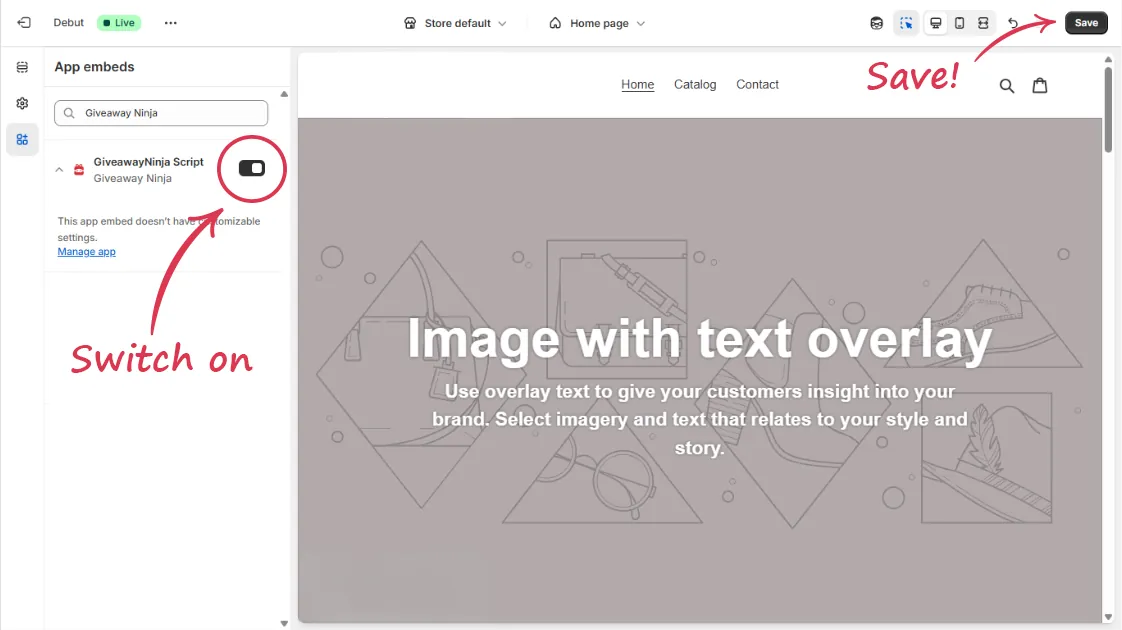
If your giveaway isn't appearing on Shopify, the most common cause is that the app embed isn't switched on in your theme. Turn it on under Theme Editor > App Embeds > GiveawayNinja Script, then refresh the page twice. If the embed is already on, the giveaway is usually held back by a disabled campaign, a future start date, a restrictive filter, or a JavaScript error left behind by another app.
How do I turn on the app embed?
This fixes it most of the time. Open Theme Editor > App Embeds and switch on GiveawayNinja Script. Refresh the storefront a couple of times so Shopify has time to load the new script.
The embed is on but the giveaway still won't show. What should I check?
Work down this list in order. Any one of these can hide a live giveaway.
- Confirm the campaign itself is enabled.
- Check the start date. It has to be set to a date in the past for the giveaway to be live.
- Remove any restrictive PAGE, REFERRER or COUNTRY filters that might be blocking the current visitor. See how page filters work.
- If you embedded the giveaway on a landing page, make sure the code sits inside the HTML view, not the visual editor.
- Make sure your shop isn't loading the slim build of jQuery, which leaves out features the widget needs.
- Rule out JavaScript errors on the page, covered next.
Why would a JavaScript error stop my giveaway from loading?
Your theme can carry JavaScript errors that have nothing to do with Giveaway Ninja. These often come from apps that left broken code behind after being uninstalled. When one of them stops Shopify's asyncLoader before our main script runs, the widget never gets the chance to render.
Open your browser's console and look for this line failing:
if (lightJsExclude.indexOf(urls[i]) === -1)If it's there, replace this:
if (lightJsExclude.indexOf(urls[i]) === -1) s.type = 'lightJs'; else s.type = 'text/javascript';with this:
s.type = 'text/javascript';In our experience, the AVADA SEO app is a frequent cause of this specific error. Shopify's community thread on the lightJsExclude issue has more detail if you want it.
People also ask
Where is the app embed setting in Shopify?
It's under Theme Editor > App Embeds, listed as GiveawayNinja Script. See how do I install Giveaway Ninja on Shopify.
Why is my giveaway live but empty for some visitors?
A PAGE, REFERRER or COUNTRY filter is probably excluding them. Clear the filters and test again. See how page filters control where your giveaway appears.
My giveaway won't show on a custom landing page.
The embed code has to be pasted into the HTML view of the page editor. See how do I embed a giveaway on a Shopify page.
My entries badge or cart counter isn't showing. Is it the same issue?
Often, yes. The badge blocks need an enabled giveaway with a past start date, and a badge may hide itself when "Hide if giveaway is not active" is on. See how to show giveaway entries on Shopify product pages.
Still stuck?
Our support team is available 24/7 and always replies. Send us a message and we'll help you sort it out.