Klaviyo - Send "You earned X Points" email
It’s super easy to send “You earned X points” emails with Klaviyo.
Create a new FLOW
Click on Flows > Create: https://www.klaviyo.com/flows/create
Click on "Build your Own" and set the name (e.g., "You earned X Points - BFCM Giveaway").
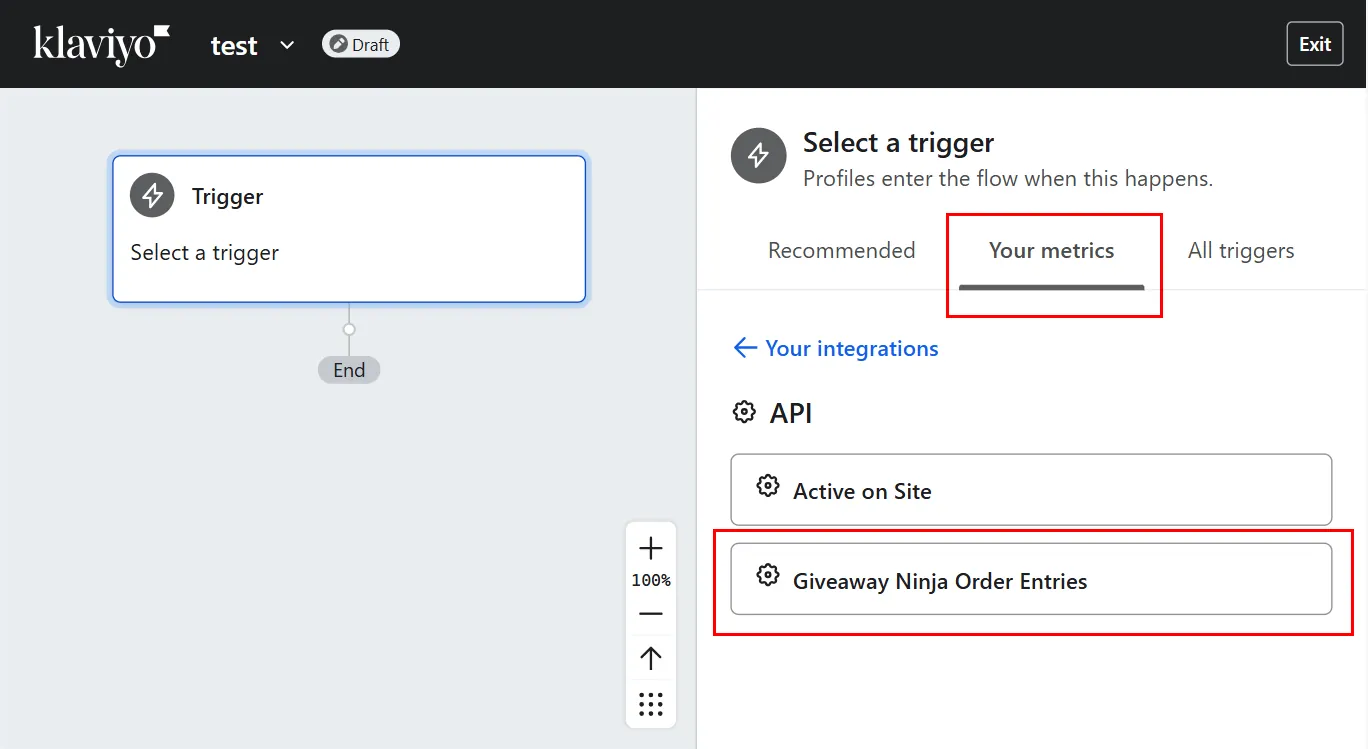
Select your Trigger
On the left pane, click on "Your metrics" > API and select the Event (the default name is "Giveaway Ninja Order Entries").
Configure the Email
It's now time to create, edit, and save the email you want to send to the user.
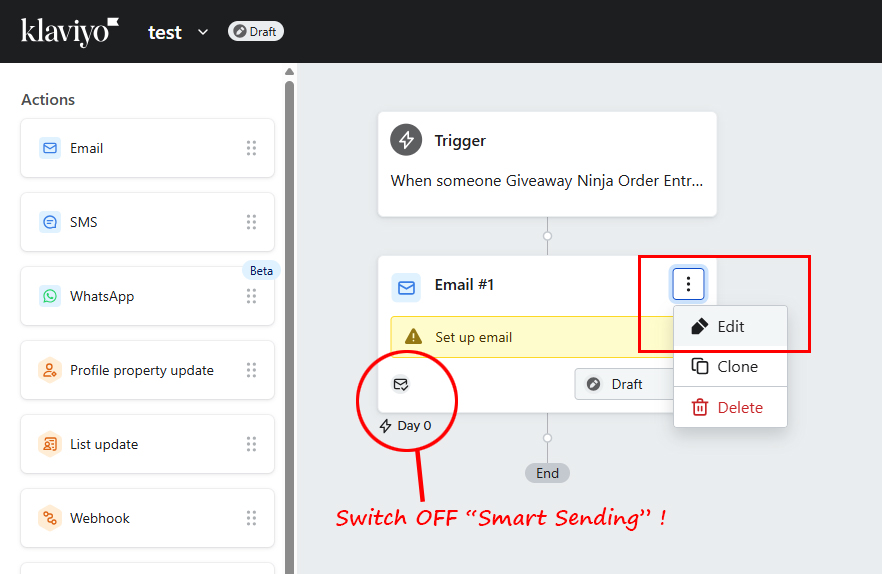
From the left pane, drag "Email" under the Trigger.
IMPORTANT: Make sure to SWITCH OFF smart sending, as you want to be able to send these notification emails anytime and don't want Klaviyo to affect the deliverability.
Click on "EDIT".
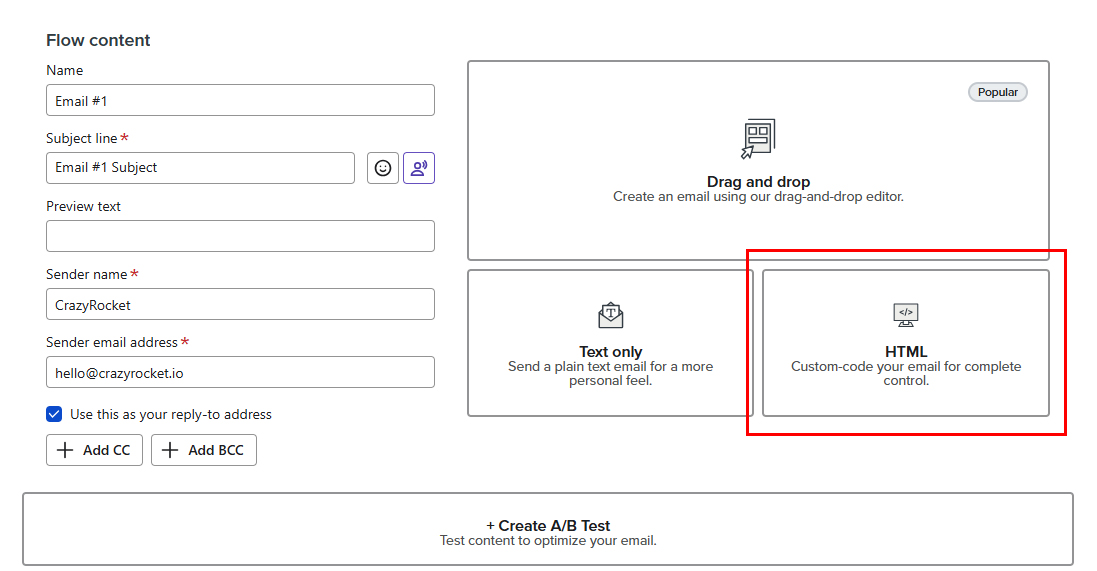
Click on HTML.
Enter this template (you can then adjust it according to your needs):
<!--[if mso]>
<noscript>
<xml>
<o:OfficeDocumentSettings>
<o:PixelsPerInch>96</o:PixelsPerInch>
</o:OfficeDocumentSettings>
</xml>
</noscript>
<![endif]-->
<table style="background-color: #fafafa; width: 100%; margin: 0; padding: 0;" role="presentation" border="0" width="100%" cellspacing="0" cellpadding="0">
<tbody>
<tr>
<td style="padding: 40px 20px;" align="center">
<table style="max-width: 600px; width: 100%; background-color: #ffffff; border-radius: 8px; box-shadow: 0 1px 3px rgba(0,0,0,0.05);" role="presentation" border="0" width="600" cellspacing="0" cellpadding="0"><!-- Header -->
<tbody>
<tr>
<td style="padding: 30px 20px; background: linear-gradient(135deg, #e0e0e0 0%, #f5f5f5 100%); border-radius: 8px 8px 0 0;" align="center">
<h1 style="margin: 0; color: #4a4a4a; font-size: 26px; font-weight: bold; text-align: center; line-height: 1.2;">🎉 Points Earned!</h1>
</td>
</tr>
<!-- Main Content -->
<tr>
<td style="padding: 30px 20px;"><!-- Thank You Message -->
<p style="margin: 0 0 15px 0; font-size: 16px; line-height: 24px; color: #4a4a4a;">Hi {{ first_name|default:'there' }},</p>
<p style="margin: 0 0 25px 0; font-size: 16px; line-height: 24px; color: #4a4a4a;">Thank you for your order <strong>#{{ event.OrderId }}</strong>! We're excited to let you know that you've earned points towards our giveaway.</p>
<!-- Points Summary Box -->
<table style="background-color: #fafafa; border-radius: 8px; margin-bottom: 25px; border: 1px solid #ececec; width: 100%;" role="presentation" border="0" width="100%" cellspacing="0" cellpadding="0">
<tbody>
<tr>
<td style="padding: 20px; text-align: center;">
<div style="margin-bottom: 20px;">
<p style="margin: 0 0 8px 0; font-size: 13px; color: #8a8a8a; text-transform: uppercase; letter-spacing: 0.5px;">Points Earned</p>
<p style="margin: 0; font-size: 32px; font-weight: bold; color: #6a6a6a; line-height: 1;">+{{ event.PointsEarned }}</p>
</div>
<hr style="border: none; border-top: 1px solid #ececec; margin: 20px auto; max-width: 80%;">
<div>
<p style="margin: 0 0 5px 0; font-size: 13px; color: #8a8a8a;">Your Total Points</p>
<p style="margin: 0; font-size: 22px; font-weight: 600; color: #4a4a4a; line-height: 1;">{{ event.TotalPoints }}</p>
</div>
</td>
</tr>
</tbody>
</table>
<!-- Referral Section -->
<table style="background: linear-gradient(135deg, #fafafa 0%, #f7f7f7 100%); border-radius: 8px; margin-bottom: 25px; border: 1px solid #e8e8e8; width: 100%;" role="presentation" border="0" width="100%" cellspacing="0" cellpadding="0">
<tbody>
<tr>
<td style="padding: 20px;">
<h2 style="margin: 0 0 12px 0; font-size: 18px; color: #4a4a4a; text-align: center; line-height: 1.2;">🚀 Earn Even More Points!</h2>
<p style="margin: 0 0 15px 0; font-size: 14px; line-height: 20px; color: #6a6a6a; text-align: center;">Earn more entries by inviting your friends with your personal referral URL:</p>
<!-- Referral URL Box -->
<table style="background-color: #ffffff; border: 2px dashed #c8c8c8; border-radius: 6px; width: 100%;" role="presentation" border="0" width="100%" cellspacing="0" cellpadding="0">
<tbody>
<tr>
<td style="padding: 12px 10px;">
<p style="margin: 0; font-size: 13px; color: #6a6a6a; text-align: center; font-weight: 600; word-break: break-all; line-height: 1.4;">{% if event.ReferralId %} https://demo.myshopify.com/pages/giveaway?njref={{ event.ReferralId }} {% else %} https://demo.myshopify.com/pages/giveaway {% endif %}</p>
</td>
</tr>
</tbody>
</table>
<p style="margin: 12px 0 0 0; font-size: 12px; color: #8a8a8a; text-align: center; font-style: italic;">Share this link and earn bonus points when your friends participate!</p>
</td>
</tr>
</tbody>
</table>
<!-- CTA Button -->
<table style="margin: 25px auto;" role="presentation" border="0" cellspacing="0" cellpadding="0" align="center">
<tbody>
<tr>
<td style="border-radius: 6px; background: linear-gradient(135deg, #9a9a9a 0%, #b8b8b8 100%); text-align: center;"><a href="{% if event.ReferralId %}https://demo.myshopify.com/pages/giveaway?njref={{ event.ReferralId }}{% else %}https://demo.myshopify.com/pages/giveaway{% endif %}" style="display: inline-block; padding: 12px 28px; font-size: 15px; color: #ffffff; text-decoration: none; border-radius: 6px; font-weight: 600; line-height: 1.2;">Invite Your Friends</a></td>
</tr>
</tbody>
</table>
<!-- Additional Info -->
<p style="margin: 25px 0 0 0; font-size: 14px; line-height: 20px; color: #7a7a7a; text-align: center;">Keep shopping and earning points for more chances to win! The more points you collect, the better your odds.</p>
<!-- Points Breakdown Rules --> {% if event.OrderPointsBreakdown %}
<table style="margin-top: 25px; background-color: #fafafa; border-radius: 8px; border: 1px solid #ececec; width: 100%;" role="presentation" border="0" width="100%" cellspacing="0" cellpadding="0">
<tbody>
<tr>
<td style="padding: 20px;">
<h3 style="margin: 0 0 12px 0; font-size: 15px; color: #4a4a4a; text-align: center;">📋 How You Earned Your Points</h3>
<ul style="margin: 0; padding: 0 0 0 20px; font-size: 13px; line-height: 22px; color: #6a6a6a;">{% for rule in event.OrderPointsBreakdown %}
<li style="margin-bottom: 6px;">{{ rule }}</li>
{% endfor %}</ul>
</td>
</tr>
</tbody>
</table>
{% endif %}</td>
</tr>
<!-- Footer -->
<tr>
<td style="padding: 25px 20px; background-color: #fafafa; border-radius: 0 0 8px 8px;">
<p style="margin: 0 0 8px 0; font-size: 11px; color: #a8a8a8; text-align: center; line-height: 1.4;">Order ID: {{ event.OrderId }} | Order Amount: ${{ event.OrderAmount }}</p>
<p style="margin: 0; font-size: 11px; color: #a8a8a8; text-align: center; line-height: 1.4;">Good luck in the giveaway!</p>
</td>
</tr>
</tbody>
</table>
</td>
</tr>
</tbody>
</table>
Take a minute to check the template to understand the merge fields Giveaway Ninja is sending to Klaviyo.
For the Subject, use this template:
🎉 You earned {{ event.PointsEarned }} point{% if event.PointsEarned != 1 %}s{% endif %}!
Save and click "DONE".
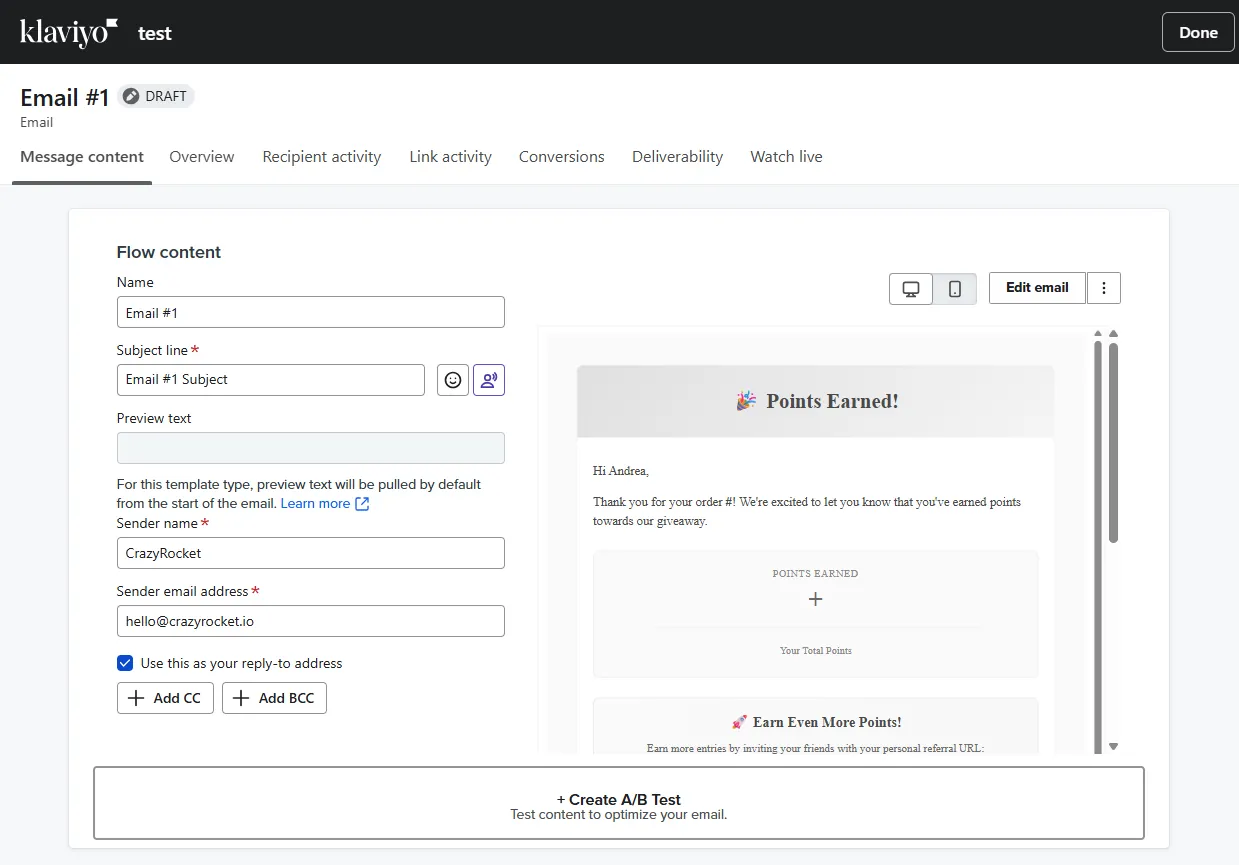
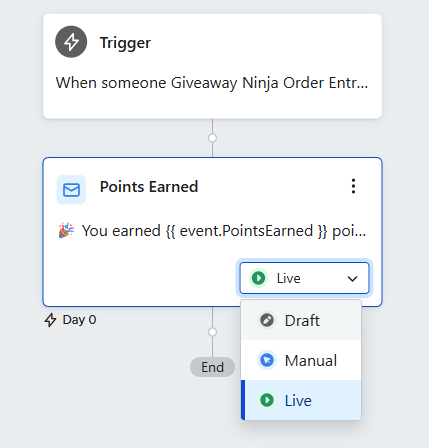
Now you need to set the flow LIVE.
Test it!
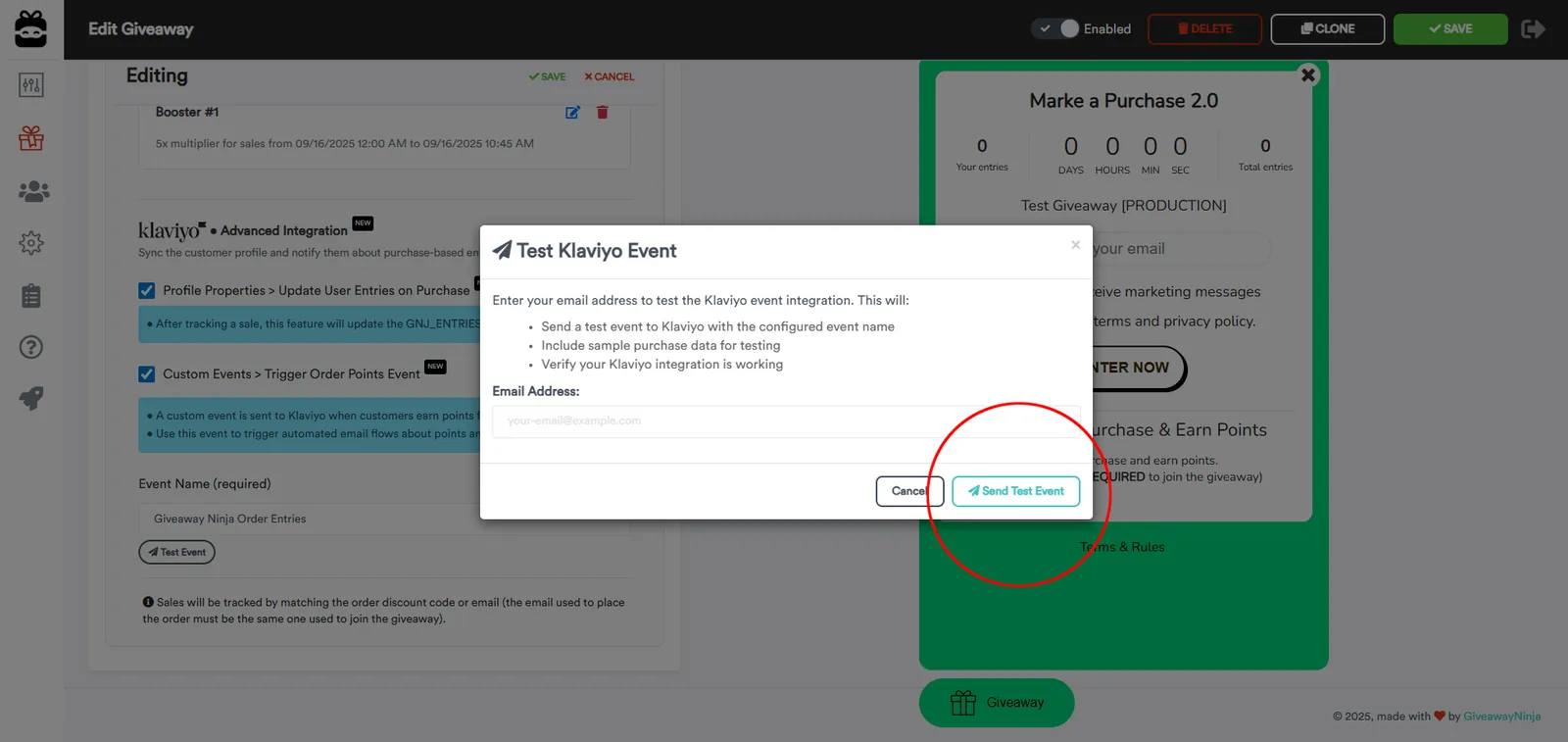
Edit your giveaway, click on Entry Actions, edit the "Make a Purchase" action, and scroll to the bottom.
Click on "TEST EVENT", enter a test email (that is a subscriber in Klaviyo), and hit "Send Test Event". You should receive a test email from Klaviyo.
Troubleshooting
If you do not receive any emails, please check the Metrics tab and ensure the event has been received correctly by Klaviyo.
NEED HELP? Contact Us